Enhanced Library Filter

We streamlined filtering across all libraries for faster, more precise searches

Posted 2026-07-06
Categories: Tips and tricks , User guides


We redesigned and streamlined the filter menus for both the project library and all component libraries and we introduced a structured dropdown list for the project types. The extended filter capabilities allow for a more precise search of the possible or required compontent.

Project Library

The Project Library now features a streamlined filter interface with:

  • Title search — quickly find projects by name
  • Project type dropdown — filter by specific project types (buried with backfill, subsea, aerial, etc.)
  • Date range filter — narrow results by modification date
  • Create button — instantly start a new project of the selected type without leaving the library

This eliminates the need to navigate back to the start screen when you want to create a new project based on a specific type you're browsing.
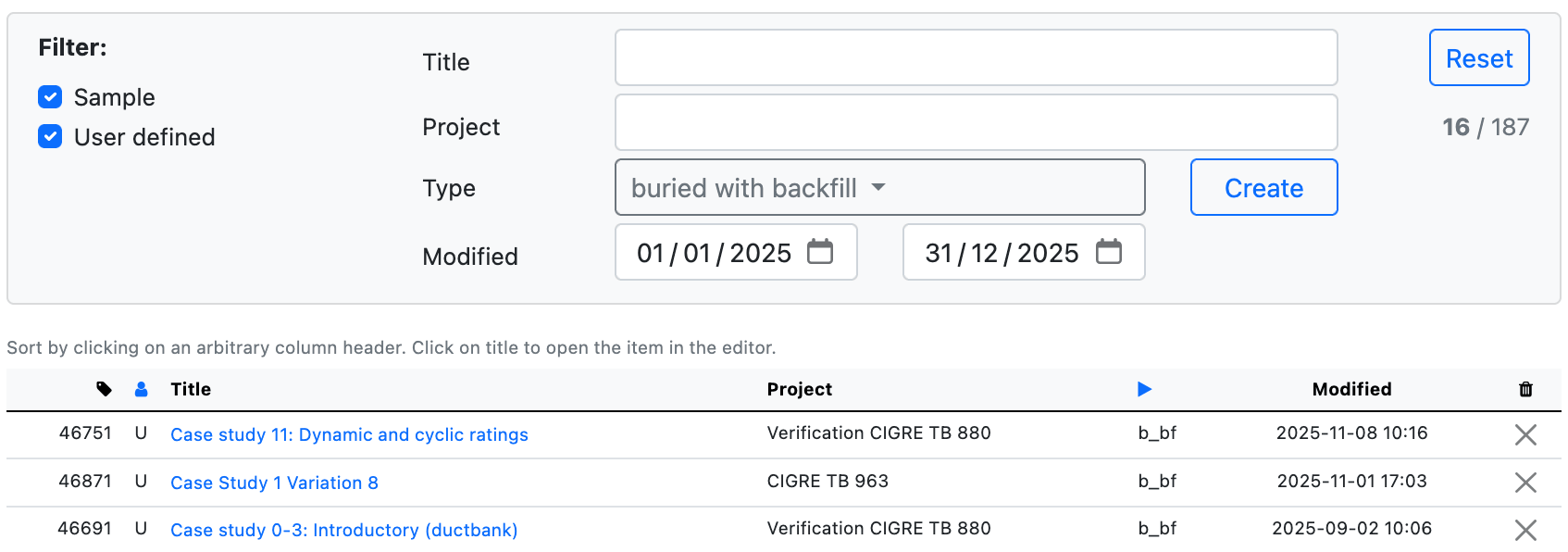
Project Library Filter Interface

Project Library with enhanced filtering and quick create functionality

Cable Library

The Cable Library now offers comprehensive multi-parameter filtering:

  • Voltage range — specify minimum and maximum operating voltage
  • Frequency selector — filter by AC/DC or specific frequencies
  • Conductor area range — find cables with specific cross-sectional areas
  • Conductor material checkboxes — select Cu, Al, or Other materials
  • Cores multi-select — choose single-core, two-core, three-core, four-core, or five-core cables
  • Conductor type multi-select — filter by construction (round solid, round stranded, round Milliken, sector-shaped, flexible)
  • Insulation diameter range — specify thickness requirements
  • Insulation material dropdown — select by insulation type
  • Conductor diameter range — new filter for conductor size
  • External diameter range — new filter for overall cable diameter
  • Material dropdowns — filter by screen, sheath, armour, and jacket materials

All dropdowns default to "show all" when nothing is selected, and multi-select fields allow you to choose multiple values simultaneously.
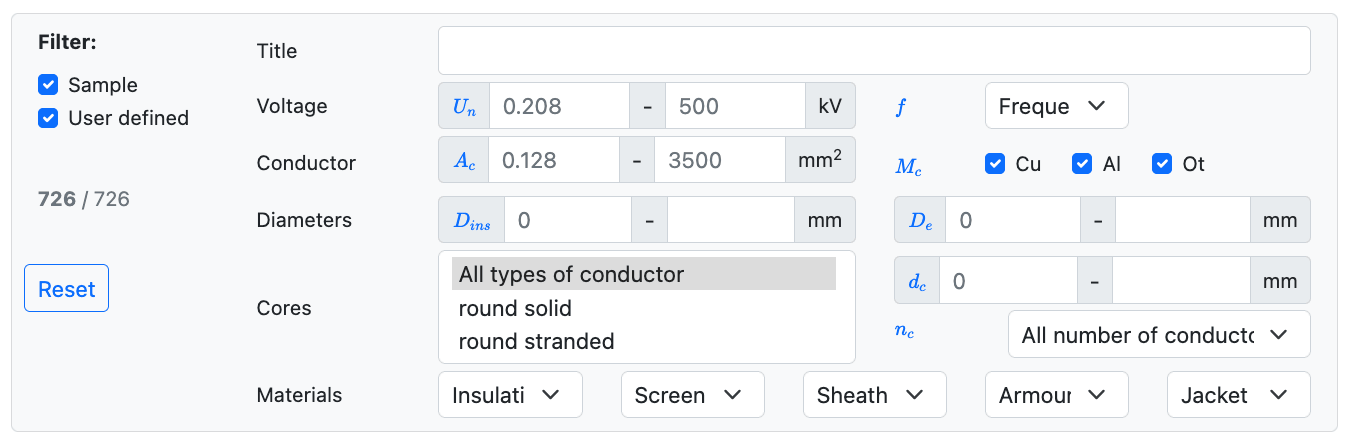
Cable Library Filter Interface

Cable Library with comprehensive multi-parameter filtering capabilities

Heat Source Library

The Heat Source Library features focused filtering for thermal systems:
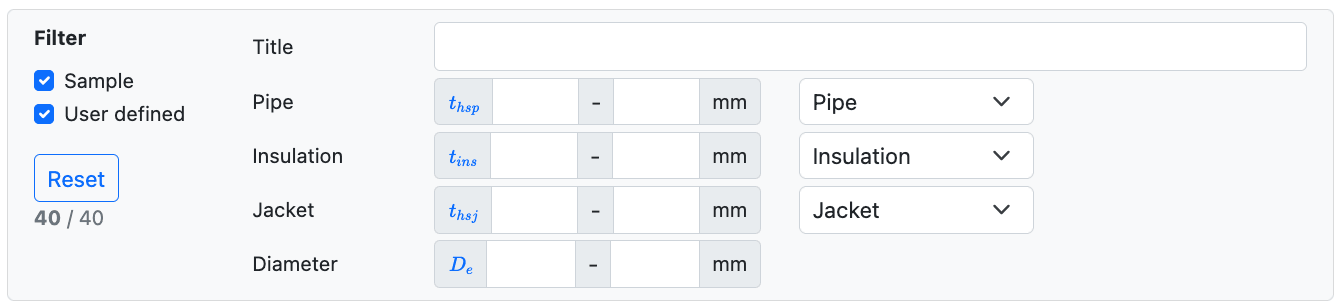
  • Pipe thickness range — filter by pipe wall thickness
  • Pipe material dropdown — select specific pipe materials
  • Insulation thickness range — specify thermal insulation requirements
  • Insulation material dropdown — choose by insulation type
  • Jacket thickness range — filter by jacket specifications
  • Jacket material dropdown — select jacket materials
  • External diameter range — find components by overall size
Heat Source Library Filter Interface

Heat Source Library with thermal system-specific filters

Gas Insulated Line (GIL) Library

The GIL Library provides specialized filters for high-voltage systems:

  • Voltage range — specify operating voltage
  • Gas type dropdown — select SF₆ or other gas types
  • Conductor area range — filter by cross-sectional area
  • Conductor type dropdown — choose by construction method
  • Core configuration checkboxes — select single-core or three-core systems
  • External diameter range — filter by overall dimensions
GIL Library Filter Interface

GIL Library with high-voltage system filters

Fiber Optic Cable (FOC) Library

The FOC Library offers streamlined filtering for optical systems:

  • Title search — find cables by name
  • External diameter range — specify cable size requirements
  • Jacket material dropdown — filter by jacket type
FOC Library Filter Interface

Fiber Optic Cable Library with streamlined optical system filters

Common Features Across All Libraries

  • Reset button — instantly clear all filters and return to the full library view
  • Result counter — displays "X / Y" showing filtered results vs. total items
  • Sample/User-defined toggles — filter between sample and user-defined components
  • Column sorting — click any column header to sort by that parameter
  • Responsive design — filters adapt to different screen sizes

The new filter system uses intelligent defaults: when nothing is selected in a multi-select field or when "all" is chosen, no filtering is applied for that parameter. This makes it easy to progressively narrow your search without accidentally hiding results.

Archive
21
9
2
3
11
24
11
9
10
2
9
11
2