We have completely overhauled our support ticket system, replacing the basic text box with a formatting editor and introducing secure file attachments. Users can now structure questions clearly and attach documents with ease, while built-in image and PDF previewers streamline troubleshooting.
Posted 2026-08-28
Categories:
User experience
Effective communication is the backbone of prompt technical support. To help you articulate complex engineering queries with clarity, we have upgraded our support ticket system with a modern rich-text editor and a robust attachment workflow.
Previously, support comments were limited to plain text fields that made sharing structured explanations, code snippets, or formatted steps difficult. Our new integrated editor brings full formatting capabilities directly to your support workflow, enabling you to organize thoughts with lists, emphasis, and clean paragraph breaks.
Alongside richer text formatting, we have introduced a comprehensive attachment manager. Whether you need to share calculation outputs, configuration logs, or project schematics, you can now attach multiple files seamlessly via drag-and-drop. To make reviewing faster and more interactive, we integrated a full-screen modal viewer for images and PDF documents, allowing support staff and users alike to inspect diagrams and reports without leaving the ticket page.
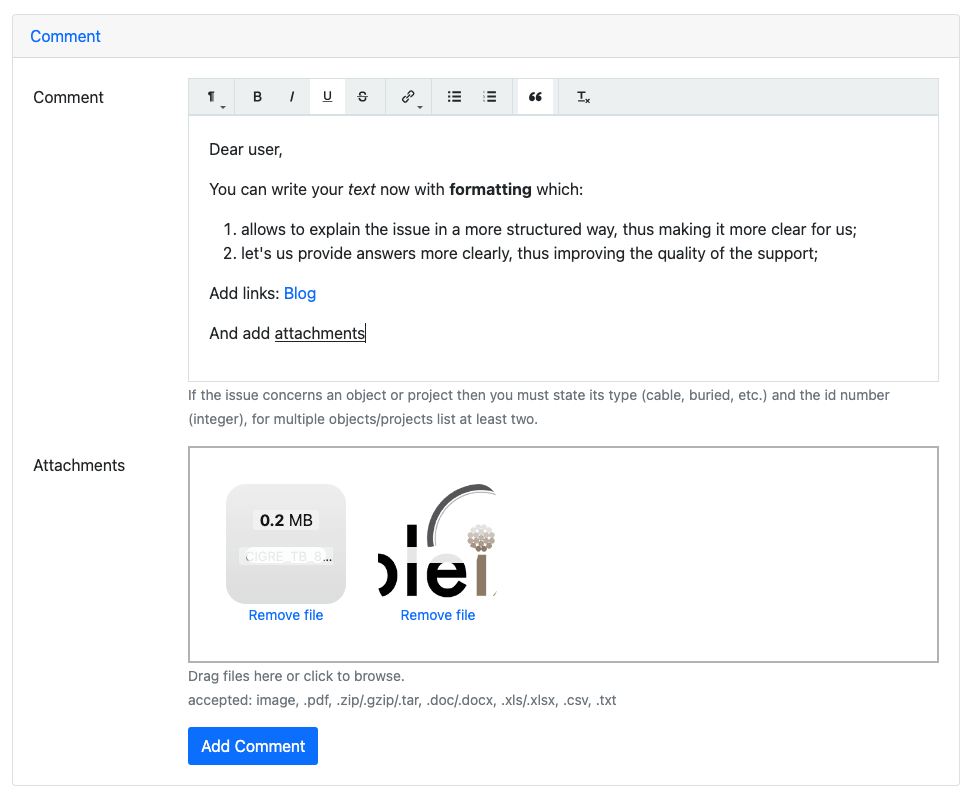
Implementing these enhancements required a balance between user convenience and data protection. The rich text editing layer is powered by Trumbowyg, configured to sanitize input safely and prevent unwanted markup injection, ensuring that all communications remain clean and secure.
Files uploaded to support tickets are stored securely within isolated server directories linked to active database records. To maintain strict data privacy and efficient storage management, attachments follow a strict lifecycle policy: they remain accessible as long as the support ticket is open, but once a ticket is resolved, closed, or deleted, all associated files are permanently wiped from the server with no option for recovery.
The file upload mechanism utilizes asynchronous background handling via Dropzone, linking attachments to comments dynamically before form submission. Meanwhile, our backend leverages Django and Jinja2 rendering environments combined with precise MIME-type validation to power the image and PDF preview modals safely in the browser.